Tally Prime Remote Access: Migrating RDS from blocked Tailscale to Twingate
Case Study: How I bypassed severe ISP-level DPI restrictions in Oman to restore mission-critical Tally Prime ERP access. A deep-dive architecture migration from Tailscale to Twingate using RDS RemoteApp, Let's Encrypt, and Zero Trust Principles.

🚀 Executive Summary
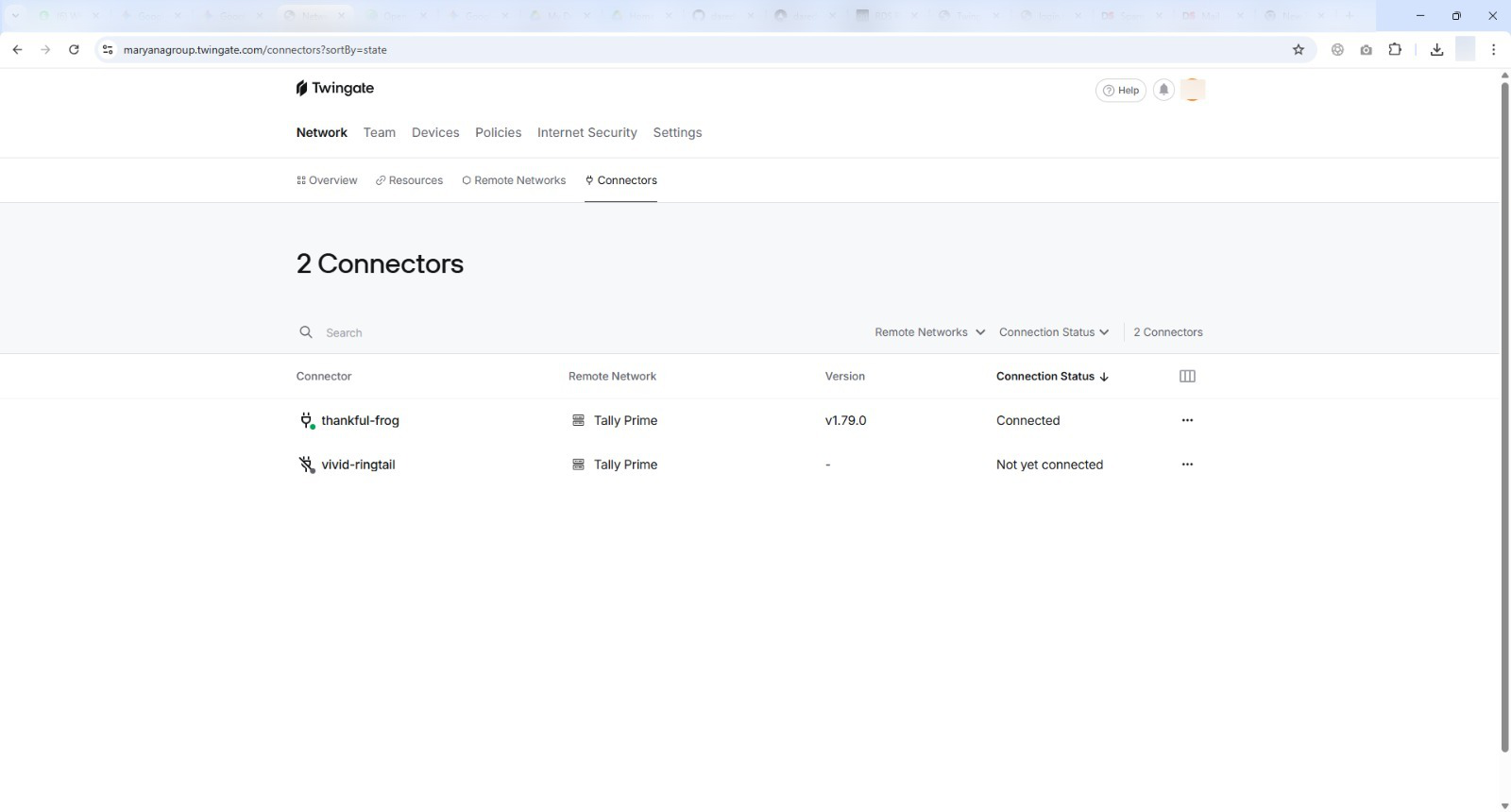
The Problem: A sudden, aggressive ISP-level block (mandated by TRA Oman) targeting VPN protocols entirely disrupted remote access to the core Tally Prime ERP system for the Maryana Group. This immediately halted branch invoicing, inventory transfers, and executive financial oversight. The Solution: I rapidly architected and executed an emergency migration from the blocked WireGuard-based Tailscale network to a Twingate Zero Trust Network Access (ZTNA) architecture. This solution bypassed the ISP’s Deep Packet Inspection (DPI) without requiring a vulnerable static Public IP or inbound firewall exceptions. The Tech Stack: Windows Server 2019 RDS RemoteApp, Ubuntu Linux (Hyper-V Connector), Let’s Encrypt (win-acme), and custom PowerShell automation for certificate lifecycle management.
1. The Challenge: Business Paralysis via DPI Blocks
This project addressed a critical, time-sensitive business continuity crisis. Remote access to the essential Tally Prime ERP system—hosted centrally via Windows Server 2019 RDS RemoteApp in the Muscat datacenter—was abruptly severed.
The existing remote access architecture relied on Tailscale. However, the Telecommunications Regulatory Authority (TRA) in Oman enforces strict regulations on encrypted communications. Local ISPs implemented aggressive Deep Packet Inspection (DPI) firewalls that actively identified and dropped unauthorized VPN packets.
Diagnostics & Root Cause Analysis
Initial frantic reports from branch managers indicated complete connection timeouts. My immediate investigation revealed that remote Tailscale clients could suddenly no longer authenticate with the Tailscale control plane or establish peer-to-peer data planes.
- Deep Packet Inspection (DPI) Fingerprinting: Running
tailscale netcheckfrom affected branches consistently failed, reportingUDP: false. Tailscale relies heavily on the WireGuard protocol (which uses UDP). The ISP firewalls were successfully fingerprinting the WireGuard handshakes and dropping the packets silently.
 Command line output demonstrating the blocked UDP traffic indicative of ISP DPI filtering.
- Double NAT Complexity: To complicate matters, the central server sat behind a restrictive Double NAT topology (Huawei 5G Modem -> TP-Link Omada Router). Direct hardware IPsec VPNs were impossible as the ISP did not provide a routing Public IP, and high-range port forwarding tests confirmed aggressive upstream filtering.
2. The Solution: Zero Trust Architecture with Twingate
The business needed a solution that could securely punch through a Double NAT environment and evade ISP DPI protocols without drawing regulatory scrutiny.
I selected Twingate as the replacement architecture. Unlike Tailscale’s UDP-heavy peer-to-peer mesh, Twingate’s Connectors rely entirely on outbound TCP/TLS connections to its cloud relays. To an ISP firewall, Twingate traffic is fundamentally indistinguishable from standard, safe HTTPS web browsing.
High-Level Network Architecture
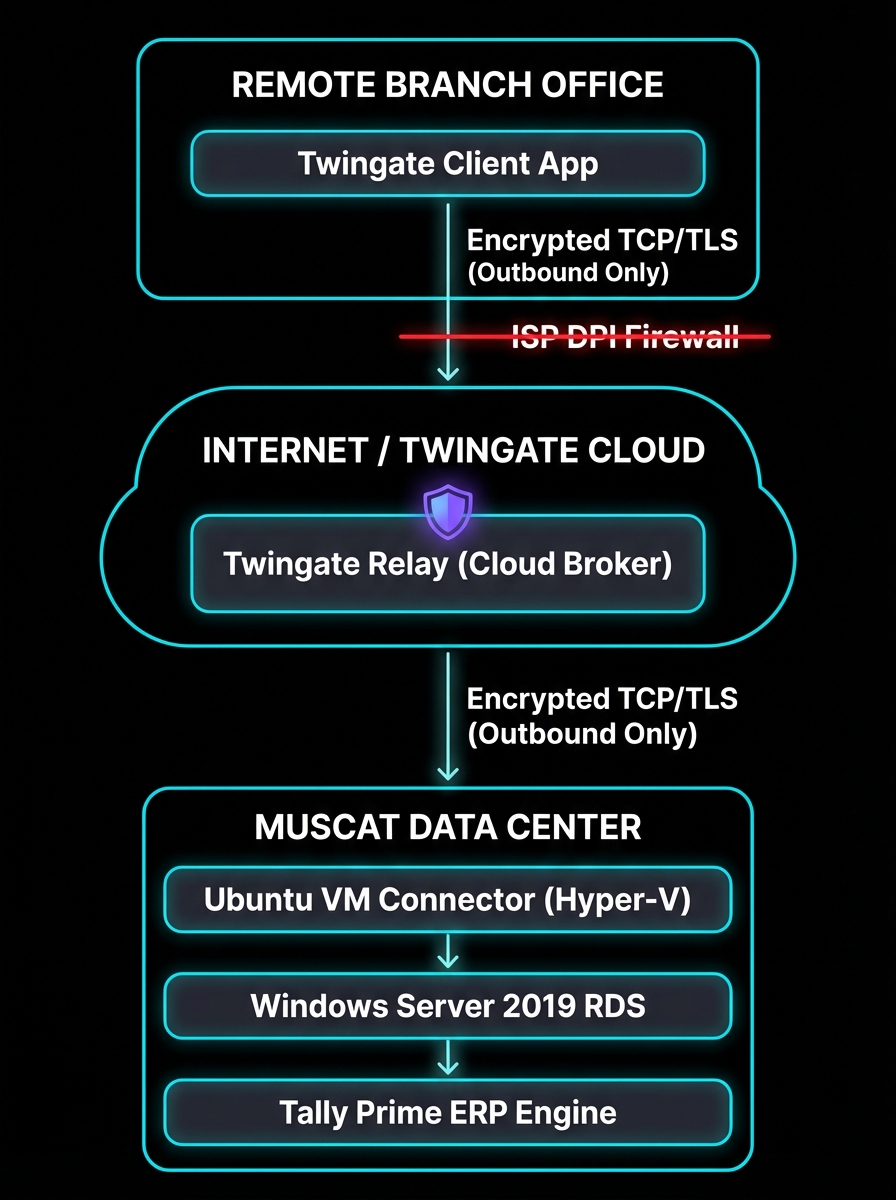
Zero Trust Data Flow: The Remote Client requests access. The Twingate Cloud Relay brokers the connection. The Ubuntu Connector (running inside the protected LAN) establishes an OUTBOUND TLS connection to the relay, pulling the authorized traffic back in, effectively bypassing the inbound Double NAT restrictions entirely.
Phase 1: Infrastructure Deployment
- Headless Connector Deployment: I provisioned an Ubuntu Server 24.04 LTS virtual machine operating on the host Hyper-V hypervisor. This lightweight Linux VM acts exclusively as the “Twingate Deployer”—the secure bridge between the cloud controller and the internal Windows LAN.
- Network Bridging: Configured a Hyper-V External Virtual Switch, assigning the Ubuntu VM a static local IP on the
192.168.0.xsubnet, granting it immediate local line-of-sight to the Windows RDS host without exposing the Windows Server directly to the internet.
3. The Certificate Challenge (Critical Engineering)
The most complex hurdle emerged during the final testing phase. While the Twingate tunnel was successfully routing TCP traffic to the Windows Server over port 3389/443, the Remote Desktop Gateway (RDG) aggressively rejected the connections.
- The Error: Clients attempting to launch the Tally RemoteApp received fatal “The server’s certificate subject name does not match the requested hostname” errors.
- The Cause: RDS expects clients to connect using a Public Fully Qualified Domain Name (e.g.,
erp.maryana.com). However, Twingate routes traffic using internal DNS (e.g.,winserv-01.local). The Windows self-signed certificate was invalid mismatch.
The Let’s Encrypt Automation Fix
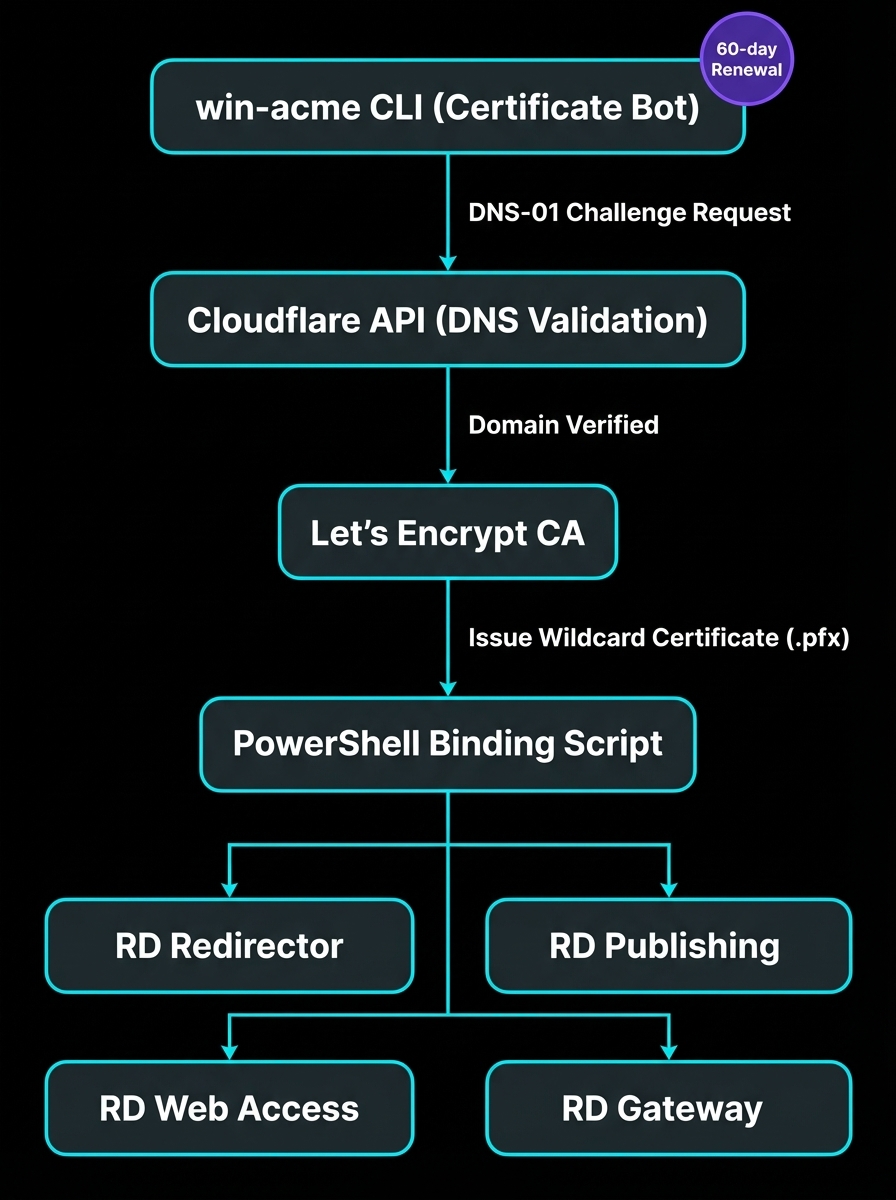
To resolve the SSL conflict gracefully without purchasing expensive premium certificates or retraining users to ignore Windows security warnings, I engineered an automated Let’s Encrypt pipeline utilizing the win-acme CLI tool and Cloudflare DNS validation.
- Created a private DNS A-record (
erp.internal.maryanagroup.com) resolving to the internal IP. - Configured
win-acmeto utilize the Cloudflare API to prove domain ownership via DNS-01 challenges, bypassing the need for port 80 to be open.
The PowerShell Binding Script:
Generating the certificate was only half the battle. RDS requires the certificate to be bound deeply across four separate roles. I modified the win-acme JSON config to force "PrivateKeyExportable": true, and authored the following PowerShell script to automate the cryptographic binding process whenever the certificate renews:
# PowerShell script triggered automatically by win-acme upon successful 60-day renewal
Import-Module RemoteDesktopServices
$CertPath = "C:\Certs\erp-internal.pfx"
$Password = ConvertTo-SecureString -String "SecureAutomatedPassphrase!2025" -AsPlainText -Force
# Bind the Let's Encrypt wildcard certificate to the entire RDS deployment topology
Set-RDCertificate -Role RDRedirector -ImportPath $CertPath -Password $Password -Force
Set-RDCertificate -Role RDPublishing -ImportPath $CertPath -Password $Password -Force
Set-RDCertificate -Role RDWebAccess -ImportPath $CertPath -Password $Password -Force
Set-RDCertificate -Role RDGateway -ImportPath $CertPath -Password $Password -Force
Write-Host "Tally Prime RDS Infrastructure TLS Certificates updated successfully." Verification of the valid Let’s Encrypt certificate successfully bound to the RDS Gateway.
4. Final Business Outcome
The emergency migration was completed within a 36-hour weekend window, successfully restoring 100% of remote access capability before the start of the business week.
- Bypassed Restrictions: The TCP/TLS outbound architecture of Twingate seamlessly evades the ISP UDP-blocking mechanisms.
- Enhanced Performance: User-reported latency when typing within the Tally Prime RemoteApp decreased significantly compared to the previous Tailscale overhead.
- Lockdown Security: Zero inbound ports are open on the corporate firewall. Access is strictly governed by Identity Provider (IdP) SSO authentication, embodying a true Zero Trust model.
- Zero-Touch Maintenance: The Let’s Encrypt SSL certificates now auto-renew perpetually via the injected PowerShell script, requiring zero ongoing administrative intervention.